Adware Report: Microsoft Windows Defender Review
 |
Product: Microsoft Windows Defender Beta 2 (March 2006 Update) Price: Currently free Company Info: Microsoft Editor Rating: 1 1/2 stars |
 Click for more info |
Pros
+ Free (for now)
+ Additional features allow you to monitor advanced system settings (such as startup files, BHOs, LSPs, and more)
Cons
- Current release doesn't remove spyware
- Update function doesn't work
- User interface has taken a turn for the worse
- Customer support is self-service only (on internet forums)
IMPORTANT NOTE: The current release of Microsoft Windows Defender ships with no signatures and most users can not download updates. We do not recommend that you use this product at this time.
Microsoft Windows Defender Product Review
Giant Company, once known as a maker of anti-spam products for your inbox, hit it big in December, 2004. Microsoft purchased the company and is now planning on embedding it into their yearly subscription PC Tune Up service to address some of the glaring security issues IE and Windows users face.
Will it work? It seems that everything Microsoft touches becomes inherently insecure. In March, hackers created a worm that disabled Microsoft AntiSpyware. The latest release, renamed to "Windows Defender", has gotten even worse. The product ships with no signatures and we've received hundreds of emails from readers who (like us) are unable to download updates. In short, the product is currently providing absolutely no protection whatsoever.
Windows Defender has been completely rewritten from the ground up in C++ (Giant Antispyware was written using Visual Basic), so it can rightfully be considered a version 1.0 product. Aside from the introduction of new bugs and quirks in the program, Windows Defender has lost the visual appeal that the previous version had. The user interface is uninspired and has that bland "off-shore development" look to it.
Although the current release of Windows Defender beta 2 doesn't provide any spyware protection, it does offer some nice system browsers that let more technically-inclined users peek into the nooks and crannies of the operating system. These tools alone make the program worth a download, but not one that we would recommend as your primary line of defense. We recommend that most people use this program in conjunction with a product from another company (once it's working, that is).
Usability
The new release of Windows Defender has taken a large step backwards in terms of usability. Unlike the previous version which had a simple and obvious user interface, this version hides the "Scan" button in a toolbar at the top of the screen. Our editor is embarrassed to admit that he stared at the screen for over five minutes, mistakenly thinking that a scan was underway, just to realize that nothing was happening.
Like many of the 1.0 anti-spyware products out there, Windows Defender has some serious usability omissions. One of these for instance is the lack of an auto-update feature. After scanning once unsuccessfully, we attempted to manually download an update. The update apparently worked (or did it? No status message whatsoever). Another scan, and no results. Another update, another scan, still no results.
A little investigation turned up the fact that Windows Defender ships with no signatures at all, which is a serious problem if the Update feature doesn't work. And we're not the only ones with this problem ... we've received hundreds of emails from people complaining that the program doesn't appear to be doing anything for them either.
The overall aesthetics of the program have taken a massive turn for the worse. The scanning screen looks like it was pieced together in a few hours... surely this can't be more than a placeholder until the final graphics are put in place.
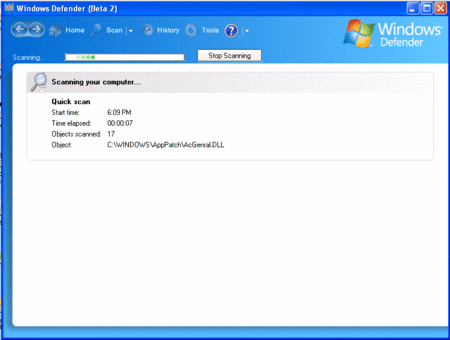
Windows Defender sports one of the worst interfaces we've ever seen from Microsoft
Spyware Removal
Windows Defender beta 2 is not currently working, so we were unable to determine its effectiveness. If you are running this program as your only anti-spyware tool, you should immediately download another product as you are almost completely unprotected.
Rollback
Windows Defender (presumably) allows you to rollback any changes it makes. This is helpful if you have wiped out spyware that is needed by an otherwise useful program (Real Player and Kazaa are typical examples of software embedded with spyware on your PC that wont run without it).
Customer Support
What we don't like about this product is Microsoft's lack of customer support. Expect to have to dig through the Microsoft Knowledge Base for answers to your support questions in the future unless you or your company is already paying Microsoft an annual support fee.
Other Options
Microsoft AntiSpyware includes a scheduler, as well as real-time "security agents" which protect against homepage hijacking and drive-by installs. You'll definitely need to use this, as a full scan can take over 30 minutes on the average PC.
Windows Defender still ships with a number of useful system explorers that may come in handy should you need to do some serious diagnostics on your PC. This alone can make it worth the download. For instance, a power-user could use this tool to debug the Windows Layered Service Providers, a common place for spyware to hook into the browser. Unfortunately, the tools seem to stop short of actually being able to do anything. As much as we like the inclusion of these features, this program would feel a lot more integrated if you could use them to fix your system and not just diagnose the problems.
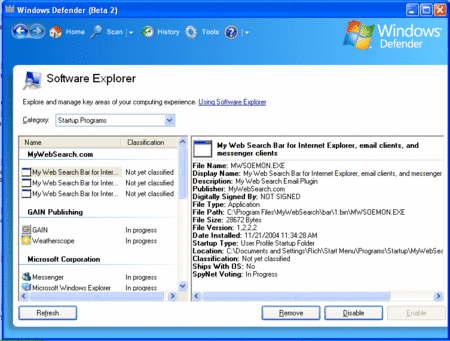
The only redeeming quality of Windows Defender is the System Explorer toolkit.
Summary
Windows Defender, currently in beta 2, has become a major disappointment. The current version contains no signatures, the update feature doesn't work, and the user interface has been completely rewritten, introducing major usability problems. Unless you are an expert computer user who can make use of the additional system diagnostic tools, there's no point in downloading this program at this time.
All articles and reviews are copyright 2004, Gooroo, Inc. All Rights Reserved.
Adware Report (https://AdwareReport.com) delivers objective news and reviews about the best and the worst spyware removal products.