




Webroot Spy Sweeper 4.5 Review |

|

|
 |
Product: Spy Sweeper 4.5 Price: $29.95 per year Company Info: Webroot Software Editor Rating: 3 stars Download Spy Sweeper |
 Click for more info |
Pros
+ Above average protection against spyware
+ Frequent updates to the spyware definition files
Cons
- Slow scanning and removal
- Some usability annoyances, such as fixed-width windows and intrusive popup alerts when new favorites are added.
Spy Sweeper Review
Webroots Spy Sweeper is an effective standalone tool for detecting, removing, and blocking spyware.
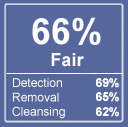
In our spyware effectiveness test, Webroot detected 69% of spyware and disabled 65% of it, making this one of the better programs in terms of sheer effectiveness.
Spy Sweeper can can detect spyware running in memory, stop browser hijackings, examine your startup settings, remove tracking cookies, and eliminate registry changes made by intruding programs. It does a good job eliminating tough-to-remove spyware that often evades detection or removal with lesser products by removing it during the next boot cycle. It can even detect when new spyware tries to install itself while you are surfing.
After removing offending spyware, Spy Sweeper will immunize your computer against certain kinds of "repeat offenders" such as browser hijackings and tracking cookies. We discovered no problems on either Windows XP or Windows 2000.
Usability
Spy Sweeper has the kind of slick interface one expects with modern utilities. You interact with the program primarily through a toolbar on the left that offers you a few simple choices but in practice, only one, "Sweep Now", is necessary.
After starting a sweep, Spy Sweeper will perform an in-depth scan of your system. A few minutes later youll be shown all spyware that was detected on your system. Webroot isnt the fastest anti-spyware of the bunch, but this isnt because of poor performance. Rather, it's because it scans every file on your hard drive instead of taking hueristic short-cuts that can lead to missed spyware.
One issue that we've had, and continue to have, with Webroot Spy Sweeper is the frequent pop-up alerts. Alerts need to be continually dismissed and interrupt scanning and removal until they are dismissed.
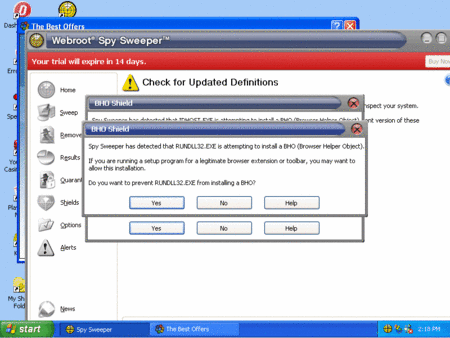
Frequent alerts make scanning with Webroot a manual process
Removal
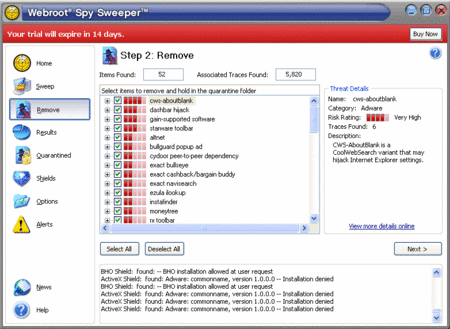
When the scan is complete, Spy Sweeper gives you a detailed report of all the spyware on your system. You can easily choose to leave certain programs installed. You might want to do this, for instance, because many free programs (such as Kazaa) will not work without their embedded spyware. If youre the curious type and like to poke under the covers, Spy Sweeper will give you a brief description directly in the window, along with a "more details" button that will bring up an informative description of the piece of software in question.
We put Spy Sweeper through our brutal Spyware Effectiveness Test. After a 17 minute scan (8 minutes faster than the previous version), it detected 69% of the spyware and disabled 65% of it. Spy Sweeper did not flag any legitimate applications as spyware. These results are lower than in our previous test due to the addition of a number of stubborn new malware programs.
Spy Sweeper was able to remove the latest version of SpywareFalcon and SpySheriff, but it failed to remove SpyAxe and CoolWebSearch. Our machine certainly ran better and faster after using this product, but it wasn't completely free from serious problems.
Quarantine
So what happens if you do remove spyware and find out later that it was necessary to run one of your favorite applications? Spy Sweeper quarantines spyware in a special folder in case youd like to recover it later.
Other Options
Spy Sweeper offers a number of other options, including the requisite scheduler, the ability to scan certain drives (useful for USB flash drives), and immunization functionality.
The immunization functionality can be customized. You can activate or deactivate shields which will guard against home page hijackings, tracking cookies, and in-memory spyware. In particular, this last option could come in handy on slower computers, which need all the performance you can squeeze out of them.
Customer Support
Webroot provides excellent customer support and a "no questions asked" refund policy. We received a number of complaints earlier this year about poor customer support, but we haven't received any recently so they may have cleared up any problems they were having.
Summary
Webroot's Spy Sweeper is one of the better products out there, with an good 65% removal rate. However, it failed to remove some of the more recent major threats and can be a bit of a resource hog. Also, the constant popup alerts means that you will need to babysit the program while it scans. While we don't consider it the top program available, it would make an excellent backup program should you continue to have popups and other spyware-related problems after trying a different product.
Purchase Price: $29.95 (1 year), $39.95 (2 years - 33% savings)
Free Trial: Yes
Download Spy Sweeper
Adware Report | Site Map | spyware reviews | Recommended Books...


