




ZoneAlarm Pro |

|

|
|
Product: ZoneAlarm Pro Price: $39.95 ($10 off through Adware Report) Company Info: ZoneLabs Editor Rating: 4 stars |
Pros
+ Provides back up defense that complements anti-virus and anti-spyware tools
+ Blocks incoming probes and attacks
+ Monitors outgoing network activity
+ "Panic" button lets you stop all internet communication in case of attack
Cons
- Needs initial "training" period to learn about your computer
- Pop-up alerts repeatedly appear for the same programs
- Constant 'nag' screens to purchase ZoneLabs' Anti-Virus product.
ZoneAlarm Review
ZoneAlarm is one of the premier firewall solutions for home and business computers. It provides a rock-solid backup defense against spyware, Trojans, and viruses. If you maintain sensitive data on your PC, are worried about internet intrusion, data theft, or even data loss, you should probably be running this software.
After an initial break-in period, the ZoneAlarm firewall will silently protect your computer against continual break-in attempts and other intrusions that anti-virus and anti-spyware programs dont catch.
While the high-end version of ZoneAlarm (ZoneAlarm Security Suite) comes with a variety of other tools (anti-virus, anti-spam) designed to secure your computer, their real strength lies in their firewall offering we recommend the base level product only (ZoneAlarm Pro).
Note: Firewall products protect against different threats than anti-spyware and anti-virus programs, and you should always run a firewall in addition to those other types of security products. Click here for more information about firewalls.
Installation and Configuration
Installation was straightforward on our Windows XP test machine and took less than 5 minutes.
Configuration on the other hand, is a bit more complex. Fortunately, firewall products are far easier to configure than they used to be. When you first run the program, ZoneAlarm kicks off a "configuration wizard" that asks you a few questions and will automatically configure the program in an optimal manner for most systems. We found the wizard to be a bit cumbersome and would like to see most of these questions removed from the next version of the program.
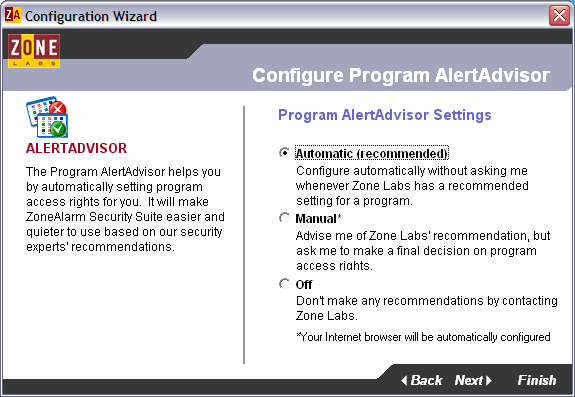
Among the questions the wizard asks are:
1. Do you want to share your security settings with ZoneLabs? Although in theory this will help ZoneLabs create better products, we prefer to save our bandwidth, so we choose no. If youre on DSL or a LAN, clicking yes wont hurt you any.
2. Automatically configure the program using standard settings (AlertAdvisor)? For sanitys sake, we highly recommend you choose Automatic. Otherwise, youll have to spend a lot more time manually configuring your installation.
3. Turn on ZoneLabs Antivirus? Weve not had good results with ZoneAlarms built-in antivirus program, so we prefer to leave it off.
4. Use ZoneAlarms built-in spam filter? ZoneLabs has embedded MailFrontiers Matador product into ZoneAlarm to provide spam filtering. While this is an ok product, there are better ones out there, so again, we choose no. If you arent using an anti-spam program already though, you should pick yes.
5. Turn on IM Security? Definitely select yes
6. Turn on Web-filtering? if you arent worried about kids surfing the internet, you should probably leave this off. It can slow down your browser.
7. Turn on Privacy Control? This is built-in to most browsers these days, so leave it off.
8. Turn on Cache Cleaner? Your choice. This will free up space on your computer and possibly make your browser run faster. We selected yes.
After answering these questions and re-booting your PC, youre all done. Just a few minutes of work and you have now added a powerful layer of protection against internet threats to your computer.
Usability
First, you should be aware that there are some occasional annoyances you are going to have to put up with when using any firewall product. Primarily, you will occasionally receive alert pop-ups that will require your attention, such as the following.
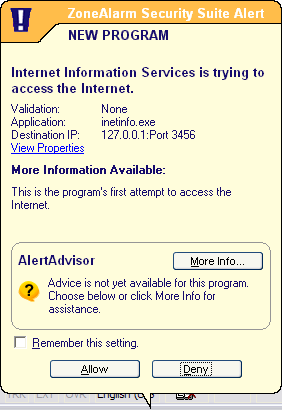
ZoneAlarm raises these alerts when an unidentified program running on your computer attempts to access the internet. If you recognize the program, then click allow and you wont be bugged about it again. If you dont recognize it, you might want to deny it until you figure out exactly what it is. The good news is that youll have to deal with most of these one time only. We did find that for some programs, the pop-ups wouldn't remember our settings and would appear over and over again.
Annoyances aside however, youll feel real good the first time you receive one of these pop-ups:
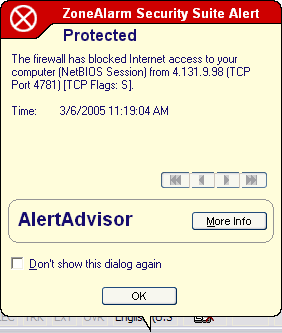
This is an alert that someone on the internet has just tried to hack or probe into your computer, and youll see them a lot until you click the Dont show this dialog again checkbox. We see these alerts about once every 5 minutes on our Earthlink account. Once you click on the checkbox, ZoneAlarm will quietly protect you against these intrusion attempts. (As an aside, keep in mind that your anti-spyware product will not protect against these hacking attempts. That type of software is designed specifically to remove spyware and adware only. Firewalls go a long way towards preventing that software from ever getting on your computer in the first place).
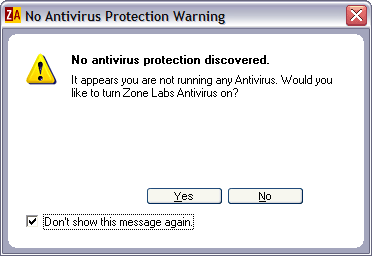
One problem that we have with ZoneAlarm is that it frequently asks us if we want to enable ZoneAlarms anti-virus functionality. Despite the fact that we click the Dont show this message again checkbox, we still get it nearly every time we reboot. Hopefully the next version will fix this problem.
Theres just one more thing you should become familiar with when using this software: the dashboard:
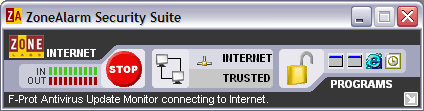
There are just a few things on this window you need to know:
In and Out data meters on the left you can completely ignore these.
The big, red Stop button if something has gone horribly awry on your computer and you think youre under attack, click this button to cut off any and all internet access.
The padlock this will temporarily prevent data access between your computer and the internet. You can click it when you walk away from your computer (for the overly paranoid) or it will turn on automatically if youre idle for 20 minutes or so. If you run automated processes on your computer (for instance, automatic updates), this can interfere with these programs so you might want to turn it off.
A list of running programs (on the right) again, you can ignore this as its not very helpful.
Trusted and Blocked zones (in the middle) clicking anywhere in this section will open up a window that allows you to add other computers to your trusted list. This is very useful if your PC is running on a home network, for instance.
Summary
ZoneLabs powerful firewall product, ZoneAlarm, is a nearly mandatory product for most computer users because it adds a powerful back-up defense system that complements your anti-virus and anti-spyware software. After a short learning period, the program will quietly protect your computer without so much as a peep unless you come under attack, in which case the program will lock down your computer air-tight.
Price: $39.95
Download ZoneAlarm Pro
Adware Report | Site Map | spyware reviews | Recommended Books...


